

Why On-Page SEO is Your Fast Track to Better Rankings
On page seo for beginners is the foundation of every successful website’s search strategy. It’s the practice of optimizing individual web pages to rank higher in search engines and attract more organic traffic.
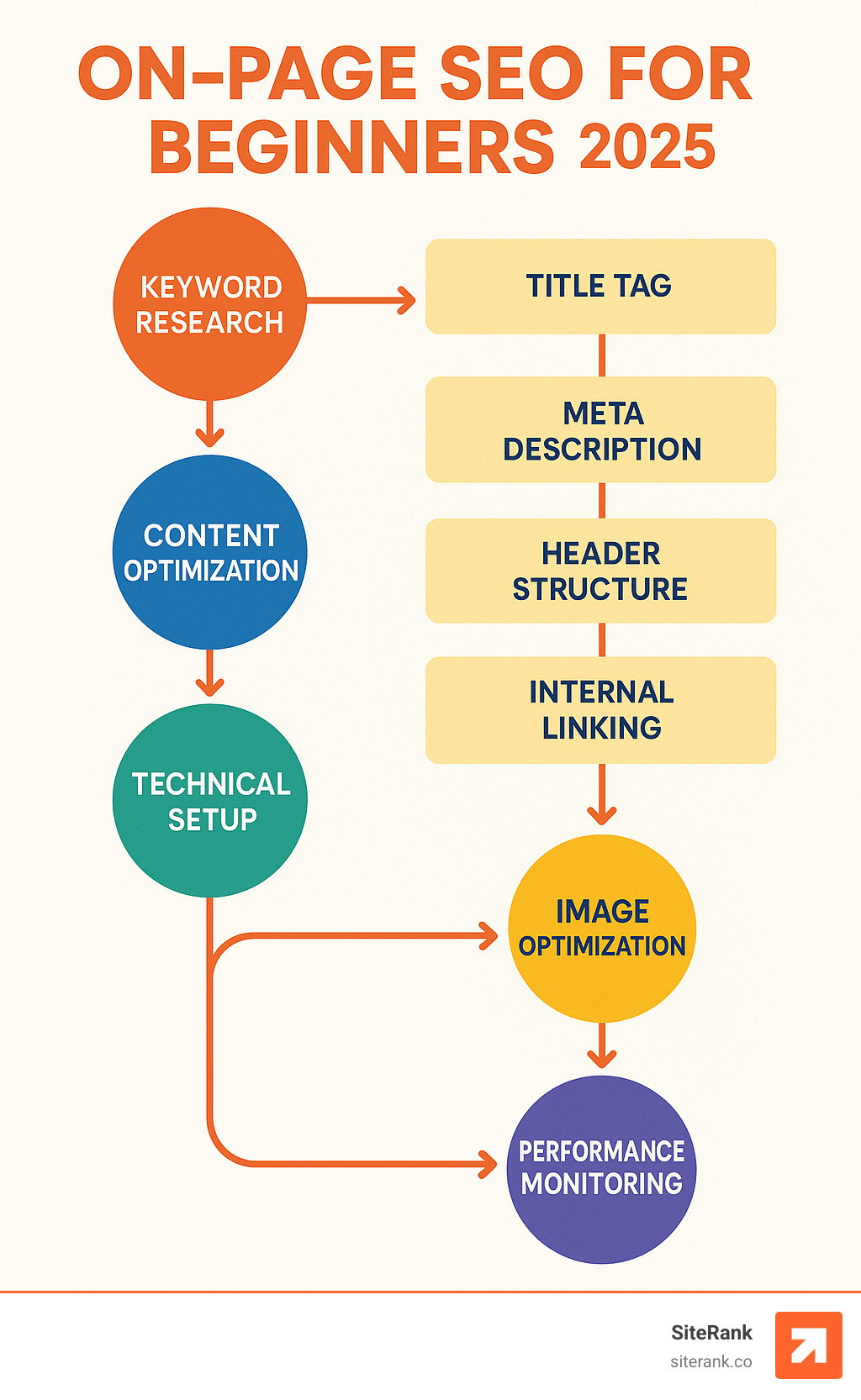
Here’s what on-page SEO includes:
- Title tags and meta descriptions – Your page’s first impression in search results
- Keyword placement – Strategic use of target terms throughout your content
- Header structure – Organizing content with H1, H2, and H3 tags
- Content quality – Creating valuable, comprehensive information that matches search intent
- Technical elements – URL structure, internal links, and image optimization
- User experience – Page speed, mobile-friendliness, and readability
Unlike off-page SEO (which depends on external factors like backlinks), on-page SEO gives you complete control. You can implement changes today and start seeing improvements within weeks.
The research shows that pages with optimized meta descriptions get 5.8% more clicks than those without. The average top-ranking page contains approximately 2,000 words of quality content. These aren’t accidents – they’re the result of smart on-page optimization.
I’m Craig Flickinger, founder of SiteRank, and I’ve spent over 15 years helping businesses master on page seo for beginners through systematic, results-driven strategies. My experience optimizing websites at Hewlett Packard and major hosting companies taught me that success comes from understanding both the technical foundations and user experience principles that search engines reward.
Important on page seo for beginners terms:
On-Page vs. Off-Page SEO: Setting the Stage
Think of SEO as a bowl of soup – on-page SEO is the content and technical foundation, while off-page SEO is the garnish on top. Both matter, but you need a solid base before worrying about external factors.
On-page SEO focuses on relevance signals you control:
- Content quality and depth
- Keyword placement and context
- Technical site structure
- User experience elements
- Internal linking strategy
Off-page SEO depends on external authority signals:
- Backlinks from other websites
- Social media mentions
- Brand citations
- Domain authority
- Trust signals from third parties
The key difference? On-page SEO is entirely within your control. You don’t need to wait for other websites to link to you or build complex relationships. You can optimize your title tags, improve your content, and fix technical issues immediately.
Why Beginners Must Start With On-Page SEO
For those new to on page seo for beginners, starting with on-page optimization offers several advantages:
1. Immediate Control and Quick Wins
You can implement changes today and see results within weeks. Unlike link building, which can take months to show impact, on-page improvements often deliver faster results.
2. Foundation for Everything Else
Without solid on-page SEO, even the best backlinks won’t help you rank. Google needs to understand what your page is about before it can decide where to rank it.
3. Cost-Effective Results
On-page SEO requires time and knowledge, not a big budget. You don’t need to pay for links or expensive tools – just smart optimization of what you already have.
4. Builds SEO Knowledge
Learning on-page SEO teaches you how search engines work, which makes off-page strategies more effective later.
The research confirms this approach works. Pages that focus on comprehensive on-page optimization often outrank pages with stronger backlink profiles but weaker on-page signals.
Core Elements of On Page SEO for Beginners
Mastering on page seo for beginners requires understanding the essential elements that search engines use to evaluate your content. Let’s break down each component:
The Foundation Elements:
- Keywords – The terms your audience searches for
- Title tags – Your page’s headline in search results
- Meta descriptions – The preview text that encourages clicks
- Headings – The structure that organizes your content
- Content depth – Comprehensive coverage of your topic
- Search intent alignment – Matching what users actually want
- Readability – Making content easy to consume
Google’s “How Search Works” report confirms that keyword presence remains the most basic relevance signal. This doesn’t mean keyword stuffing – it means strategically placing your target terms where they naturally fit and provide value.
The average #1 ranking post contains approximately 2,000 words, but length alone doesn’t guarantee success. Quality, relevance, and user satisfaction matter more than hitting a specific word count.
For more detailed strategies, check out our guide on 10 Content Optimization Tips.
Crafting a Perfect Title Tag & Meta Description
Your title tag and meta description are your page’s first impression in search results. They’re like a movie trailer – they need to capture attention and promise value in just a few seconds.
Title Tag Best Practices:
- Keep it under 60 characters to avoid truncation
- Include your primary keyword near the beginning
- Make it compelling and clickable
- Use emotional words when appropriate
- Include your brand name when space allows
Research shows that titles with positive emotional sentiment achieve a 4.1% higher click-through rate than neutral titles. Words like “ultimate,” “complete,” or “proven” can boost performance.
Meta Description Optimization:
- Write 155-160 characters for optimal display
- Include your target keyword naturally
- Add a clear call-to-action
- Highlight your unique value proposition
- Use active voice for directness
Even though Google rewrites about 63% of meta descriptions, writing compelling ones still matters. When Google does use your description, it needs to convert browsers into visitors.
Example of a Strong Title and Description:
- Title: “Complete Guide to On-Page SEO for Beginners (2024)”
- Description: “Master on-page SEO with our step-by-step guide. Learn keyword placement, title optimization, and technical tips that boost rankings fast.”
Using Headings to Map Search Intent for “on page seo for beginners”
Headers (H1, H2, H3) serve dual purposes: they organize content for readers and signal topic hierarchy to search engines. Google’s John Mueller has confirmed that headers are a “strong signal” and ranking factor.
H1 Tag Strategy:
- Use only one H1 per page
- Include your primary keyword naturally
- Make it descriptive and compelling
- Keep it under 70 characters when possible
H2 and H3 Structure:
- Use H2s for main topic sections
- Include related keywords in some H2s
- Use H3s for supporting points
- Maintain logical hierarchy
Example Header Structure for “on page seo for beginners”:
H1: A Beginner's Guide to On-Page SEO Success
H2: What is On-Page SEO?
H3: On-Page vs Off-Page SEO Differences
H2: Essential On-Page SEO Elements
H3: Title Tag Optimization
H3: Meta Description Best Practices
H2: Technical On-Page SEO Basics
This structure helps both users and search engines understand your content flow while naturally incorporating your target keywords.
Smart Keyword Placement & Density
Keyword placement in on page seo for beginners isn’t about stuffing terms everywhere – it’s about strategic, natural inclusion that improves readability and relevance.
Primary Keyword Placement:
- In the first 100 words of your content
- In your title tag and H1
- In at least one H2 or H3 heading
- In your meta description
- In image alt text
- In your URL slug
Semantic Variants and Related Terms:
Modern search engines understand context and synonyms. Instead of repeating the same keyword, use related terms:
- “on-page optimization” instead of always “on-page SEO”
- “search engine optimization” as a variant
- “SERP rankings” instead of always “search rankings”
Avoiding Keyword Stuffing:
The research shows there’s no magic keyword density to target. Focus on natural language that serves your readers. If a keyword appears 8 times in a 3,200-word article (like one successful example we found), that’s about 0.25% density – hardly stuffing.
Latent Semantic Indexing (LSI) Keywords:
Include terms that commonly appear alongside your main keyword:
- For “on page seo for beginners”: meta tags, title optimization, content strategy, search rankings, organic traffic
For advanced techniques, explore our comprehensive guide on On-Page SEO Optimization Techniques.
Technical & UX Foundations That Support Rankings
Technical SEO and user experience work hand-in-hand to support your on-page optimization efforts. Google’s algorithm considers hundreds of ranking factors, but several technical elements have confirmed impact on rankings.
Core Technical Elements:
- Site Speed – Page load time affects both rankings and user experience
- Mobile-First Design – Over 60% of Google searches happen on mobile devices
- HTTPS Security – A lightweight but confirmed ranking signal since 2014
- Crawlability – Ensuring search engines can find and index your pages
- Internal Links – Helping search engines understand your site structure
- Image Optimization – Improving load times and accessibility
Core Web Vitals Impact:
Google’s Core Web Vitals are confirmed ranking factors:
- Largest Contentful Paint (LCP) – Should be under 2.5 seconds
- Interaction to Next Paint (INP) – Should be under 200 milliseconds
- Cumulative Layout Shift (CLS) – Should be under 0.1
Research shows that a 1-second delay in page load time can lead to a 7% reduction in conversions. Speed isn’t just about SEO – it’s about user satisfaction and business results.
Mobile-First Indexing:
Google uses mobile-first indexing, meaning it primarily uses the mobile version of your content for indexing and ranking. Ensure your mobile site includes:
- All important content from your desktop version
- Structured data markup
- High-quality images that load quickly
- Easy navigation and readable text
For detailed guidance on technical optimization, visit Scientific research on page speed and our On-Page Optimization Strategy guide.
Building a User-Friendly URL & Internal Link Structure
URLs and internal links create the foundation of your site’s architecture. They help search engines understand your content hierarchy and help users steer your site effectively.
URL Structure Best Practices:
- Keep URLs short and descriptive
- Use hyphens to separate words
- Include your target keyword when natural
- Avoid unnecessary parameters or dates
- Use lowercase letters consistently
Examples of Good URLs:
- Good:
/on-page-seo-beginners-guide/ - Bad:
/page-id-12345?category=seo&date=2024
Internal Linking Strategy:
Internal links pass authority between pages and help search engines find content. The research shows that pages with strategic internal links often outperform those without.
Internal Link Best Practices:
- Use descriptive anchor text (not “click here”)
- Link to relevant, related content
- Include 1-3 internal links per 500 words
- Link from high-authority pages to important pages
- Create topic clusters with pillar and cluster pages
Example Internal Link Structure:
Main Topic Page: "On-Page SEO Guide"
├── Subtopic 1: "Title Tag Optimization"
├── Subtopic 2: "Meta Description Writing"
├── Subtopic 3: "Header Tag Strategy"
└── Subtopic 4: "Image SEO Basics"
This hub-and-spoke model helps search engines understand your content relationships while providing users with logical navigation paths.
Image & Media SEO for “on page seo for beginners”
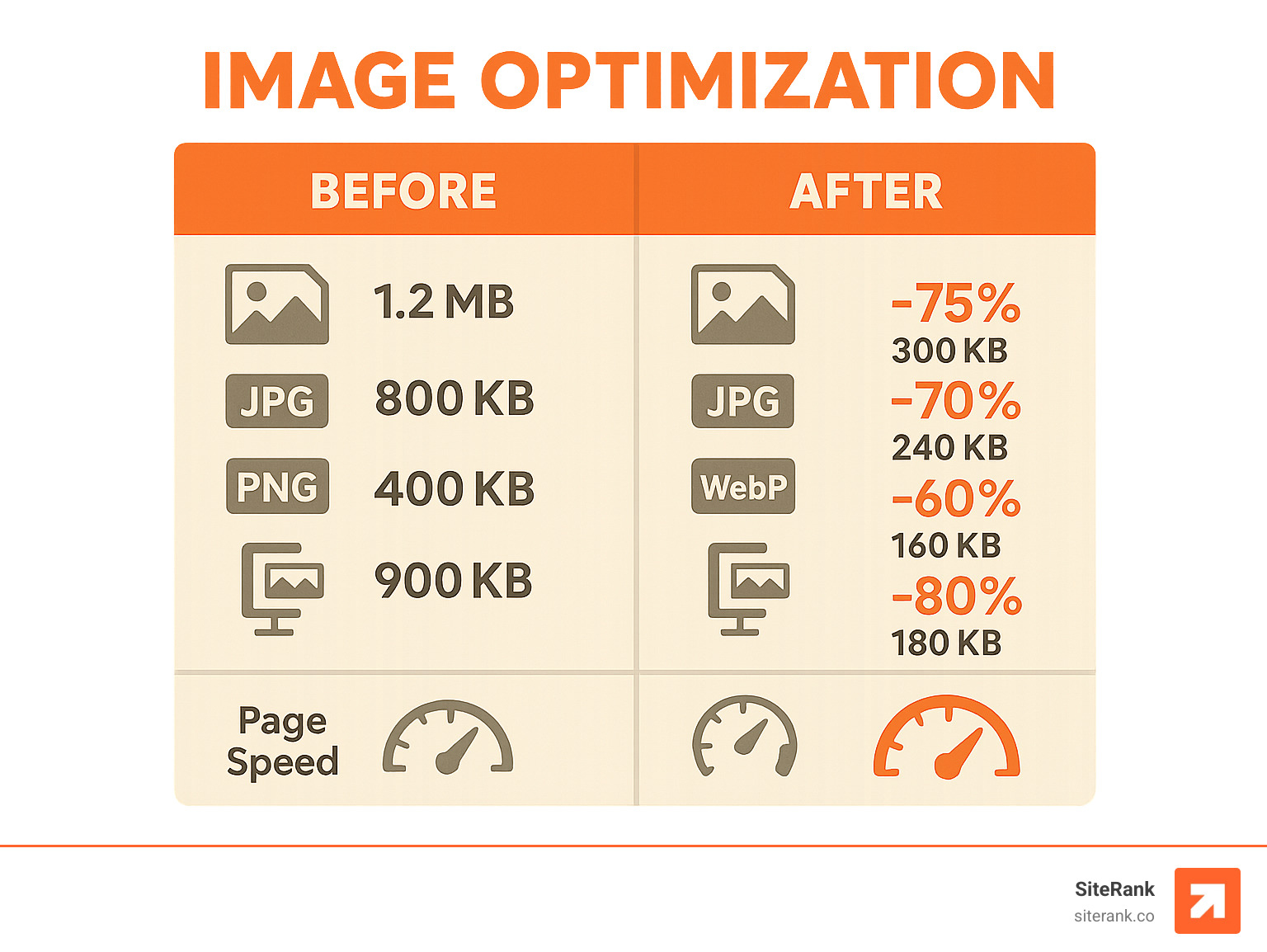
Images account for approximately 23% of search engine market share, making image optimization a crucial part of on page seo for beginners. Proper image SEO improves both search visibility and user experience.

Image Optimization Checklist:
- Descriptive Filenames – Use keywords in file names (e.g., “on-page-seo-checklist.jpg”)
- Alt Text – Describe images for accessibility and SEO (125 characters or fewer)
- Compression – Reduce file sizes without losing quality
- Proper Formats – Use WebP for modern browsers, JPEG for photos, PNG for graphics
- Lazy Loading – Load images only when needed to improve page speed
Alt Text Best Practices:
Good alt text serves both SEO and accessibility. It should describe the image clearly enough that someone could visualize it without seeing it.
Examples:
- Good: “Beginner’s on-page SEO checklist showing title tag, meta description, and header optimization steps”
- Bad: “SEO image” or “on-page SEO for beginners”
Image Compression Tools:
- TinyPNG for PNG files
- JPEG optimization tools
- WebP converters for modern formats
- CDN services for global delivery
Structured Data for Images:
Consider adding image schema markup to help search engines understand your images better. This can improve visibility in Google Images and potentially earn rich snippets.
Frequently Asked Questions about on page seo for beginners
How long until I see results?
SEO results vary based on several factors, but here’s what the research shows:
Typical Timeline:
- 2-4 weeks – Search engines find and index your changes
- 1-3 months – You’ll start seeing ranking improvements for less competitive keywords
- 3-6 months – More significant ranking gains for competitive terms
- 6-12 months – Full impact of comprehensive on-page optimization
Factors That Affect Speed:
- Site Authority – Established sites see faster results
- Competition Level – Less competitive keywords rank faster
- Content Quality – Comprehensive, valuable content performs better
- Technical Health – Sites with good technical foundations improve faster
What You Can Expect:
Some changes may reflect in a few hours, while others could take several months. Generally, wait a few weeks to assess the impact of your on-page SEO changes.
What tools should a beginner use first?
For on page seo for beginners, start with free tools before investing in premium options:
Essential Free Tools:
- Google Search Console – Monitor your site’s search performance
- Google Analytics – Track traffic and user behavior
- Google PageSpeed Insights – Check page speed and Core Web Vitals
- Google Keyword Planner – Basic keyword research
- Yoast SEO (WordPress) – On-page optimization guidance
Helpful Browser Extensions:
- MozBar – Quick SEO metrics
- SEOquake – On-page analysis
- Keywords Everywhere – Keyword data in search results
When to Upgrade:
Consider premium tools after you’ve mastered the basics and need more advanced features like competitor analysis, rank tracking, or comprehensive site audits.
How do I avoid keyword stuffing?
Keyword stuffing is one of the most common mistakes in on page seo for beginners. Here’s how to avoid it:
Signs of Keyword Stuffing:
- Repeating keywords unnaturally
- Using keywords where they don’t make sense
- Prioritizing keywords over readability
- Having an unusually high keyword density
Best Practices:
- Write for humans first – If it sounds unnatural, it probably is
- Use synonyms and variations – “SEO” and “search engine optimization” both work
- Focus on topics, not just keywords – Cover related concepts naturally
- Read your content aloud – Awkward phrasing usually indicates over-optimization
Natural Keyword Usage Example:
Instead of: “On page SEO for beginners is important. On page SEO for beginners helps rankings. Learn on page SEO for beginners techniques.”
Write: “On-page SEO for beginners forms the foundation of successful search optimization. These techniques help improve rankings by making your content more relevant and user-friendly.”
The Bottom Line:
There’s no magic keyword density to target. Focus on creating valuable, comprehensive content that naturally incorporates your target terms while serving your readers’ needs.
Conclusion
Mastering on page seo for beginners is a journey, not a destination. The fundamentals we’ve covered – from crafting compelling title tags to optimizing images and building user-friendly site structures – form the foundation of every successful SEO strategy.
Key Takeaways:
- Start with on-page SEO because it’s entirely within your control
- Focus on user experience alongside search engine optimization
- Create comprehensive, valuable content that matches search intent
- Optimize technical elements like page speed and mobile-friendliness
- Use keywords naturally and strategically throughout your content
- Build a logical site structure with clear navigation and internal linking
Your Next Steps:
- Audit your current pages using the techniques we’ve discussed
- Implement the most impactful changes first (title tags, meta descriptions, content optimization)
- Monitor your results using Google Search Console and Analytics
- Continuously refine and improve based on performance data
SEO is an ongoing process. Search engines evolve, user behavior changes, and your content needs regular updates to maintain its effectiveness. The research shows that pages with fresh, updated content often outperform static pages over time.
Continuous Improvement:
- Review your analytics monthly to identify improvement opportunities
- Update your content quarterly to keep it current and comprehensive
- Stay informed about SEO best practices and algorithm updates
- Test different approaches to see what works best for your audience
As an AI-powered SEO partner, SiteRank specializes in helping businesses implement these strategies without the complexity of managing every detail yourself. Our customized approach focuses on the optimizations that matter most for your specific situation, ensuring you get results without unnecessary complexity.
Ready to take your on-page SEO to the next level? Explore our comprehensive on-page SEO services to see how we can help accelerate your search success.
The journey to SEO mastery starts with solid on-page foundations. With the knowledge and strategies outlined in this guide, you’re well-equipped to build a website that both search engines and users will love.